Make ID Photo Files: Lay Out 30×40 mm Photos on 3.5×5 in and Order Photo Prints (Free)
This tutorial shows how to make a 3.5×5 in (89×127 mm) image with four 30×40 mm ID photos from a phone photo. You then have the image made into photo prints (printed on photographic paper) at a photo shop or online print service. Using HiROs Studio's Image Print app, it covers everything from cropping to saving the image. Nothing to install and no account needed.
The steps assume the latest Chrome or Edge on a computer.
Before you start: do not print ID photos on your own printer
Please finish ID photos as photo prints. Photos printed on an inkjet or laser printer at home or at work tend to smudge or change color, and are not suitable as ID photos.
For official documents, photos printed on plain paper are not accepted, and even on photo paper, photos with ink smudges or visible print dots are rejected. For example, in Japan the Tokyo Metropolitan Police do not accept driver's license photos printed on anything but photo paper, and Kanagawa Prefecture rejects passport photos with ink smudges or print dots.
These are only examples. Rules differ by country, region and where you submit the photo, and some rules are not published online. Some places do not accept printer-printed photos at all, even on photo paper. Companies, schools and exam bodies also have their own rules, not just government offices. Always check with the place you submit to before using photos made with this tutorial. If you are not sure, having your photo taken at a photo studio or photo booth is the safe choice.
Practice file
- Portrait photo (sample-person.jpg) … a free-to-use photo (CC0). After practicing, do the same with your own photo.
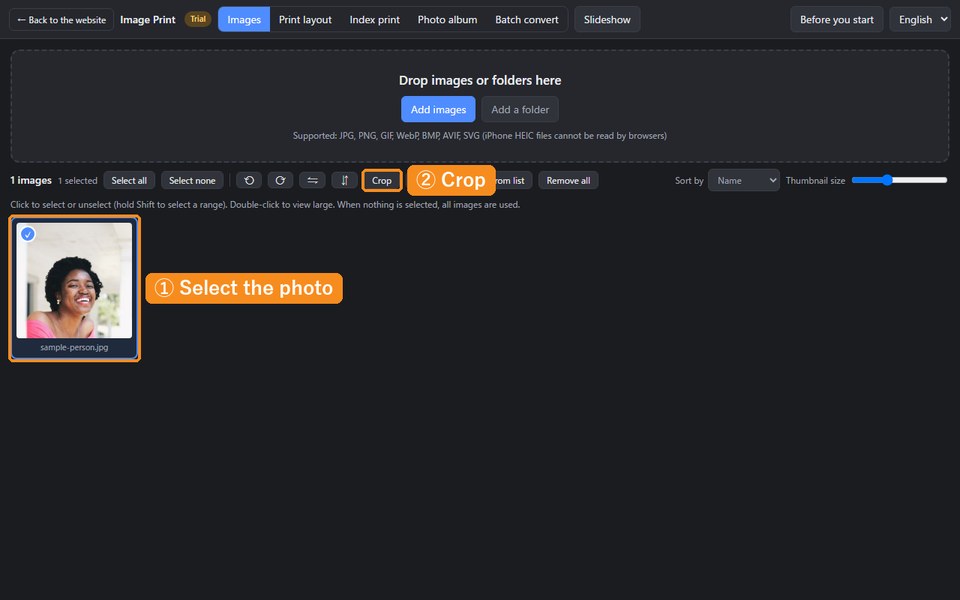
1. Add the photo and start cropping
- Open Image Print and choose the photo with “Add images” in Images.
- Click the photo to select it (a blue mark appears), then click “Crop”.
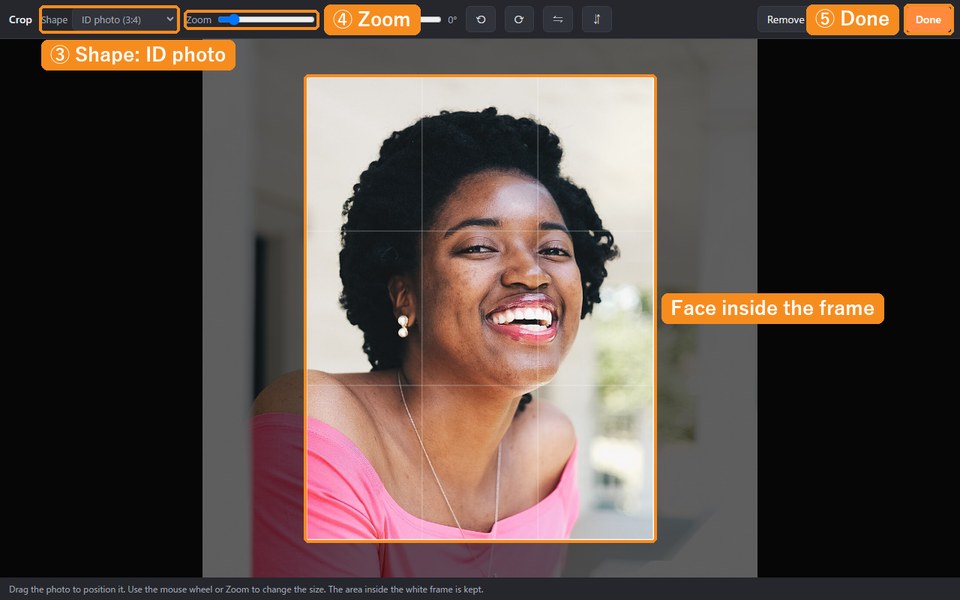
2. Crop to the ID photo shape
- Choose “ID photo (3:4)” in “Shape” at the top. It has the same proportions as 30×40 mm.
- Enlarge with “Zoom” or the mouse wheel, and drag the photo so the face is in the middle of the white frame. Leave a little space above the head and include the shoulders.
- If the photo is tilted, straighten it with “Tilt”.
- Click “Done”.
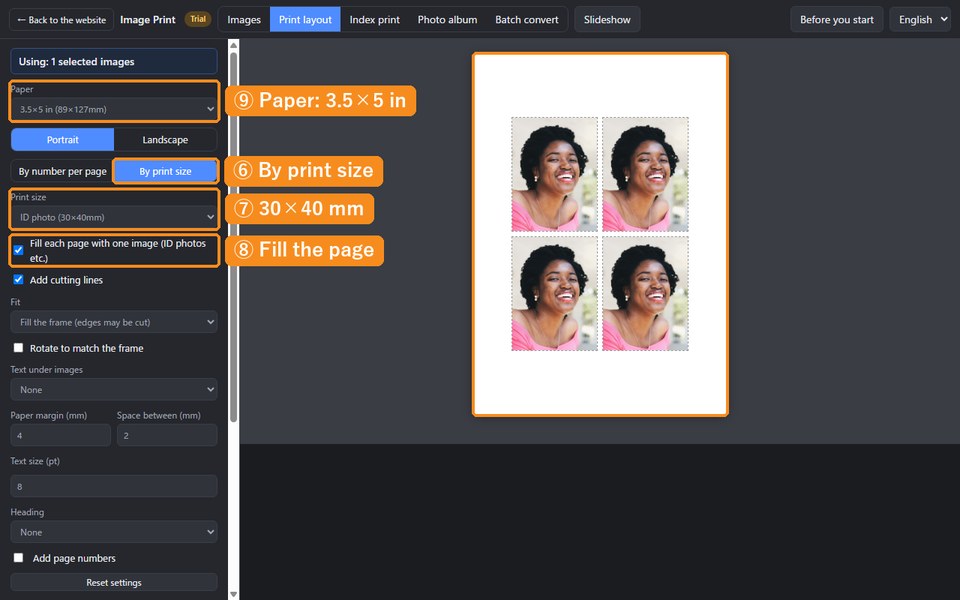
3. Put four on 3.5×5 in paper
- Click “Print layout” at the top and choose “By print size”.
- In “Print size”, choose “ID photo (30×40mm)”.
- Check “Fill each page with one image”.
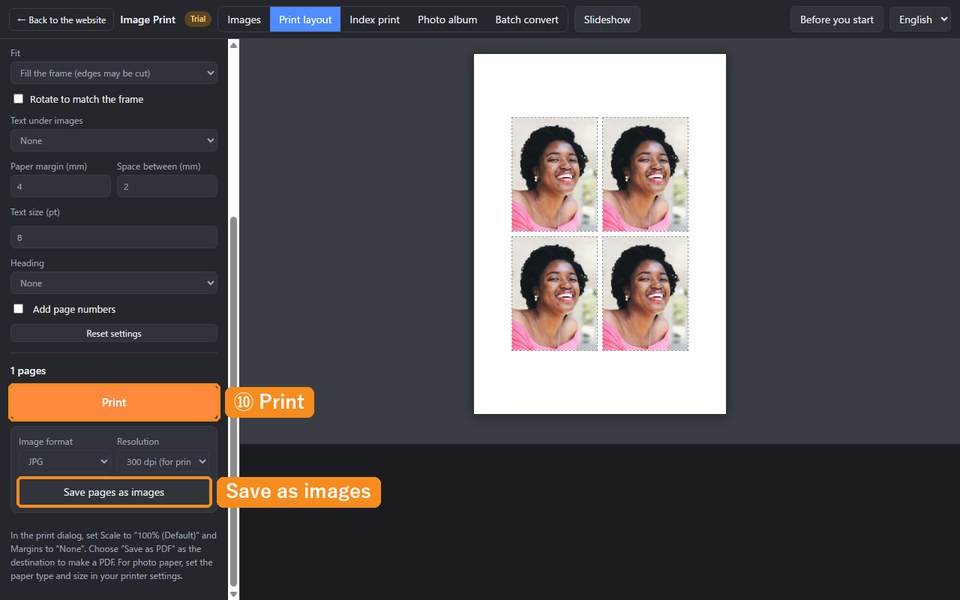
- Set “Paper” to “3.5×5 in (89×127mm)” and “Fit” to “Fill the frame”. Check “Add cutting lines” to make cutting easier.
- Set “Paper margin” to 4 and “Space between” to 2 to fit four neatly.
4. Save as an image and order photo prints
- Click “Save pages as images” to save the 3.5×5 in page as a JPG. (Do not use “Print”.)
- Take the JPG to a photo printing service, such as a photo shop or an online print service, and order it at 3.5×5 in.
When the prints arrive, cut along the cutting lines. Check with a ruler that each photo is 30×40 mm.
Other sizes
- Passport (35×45 mm): choose “Passport (35:45)” as the crop shape and “ID photo (35×45mm, passport)” as the print size.
- Other sizes: check the required size and enter the width and height (mm) with “Custom” in “Print size”.
Rules for ID photos (how they are printed, background color, face size, how recent the photo must be and so on) differ by where you submit them. Whether for official documents or for companies, schools and exams, always check those rules.
Troubleshooting
- The edges were cut off: photo prints may trim the edges of the paper slightly. Increase “Paper margin” to 5–6 mm and save again.
- The size is off: make sure you ordered 3.5×5 in prints. At another print size, the photos are enlarged or reduced by the same ratio.
- The face is too big or too small: select the photo in Images, click “Crop” again and adjust.
FAQ
Does it cost anything?
The app is free and needs no account (photo prints cost money).
Can I print them on my own printer?
We do not recommend it. Plain-paper prints are not accepted for official documents, even on photo paper, smudges or visible print dots can get them rejected, and some places do not accept printer-printed photos at all. Please order photo prints.
Are my photos sent anywhere?
Not by this app. Everything is processed inside your browser. (When you order photo prints, you hand the image to that shop or service.)
Make ID photo files in Image Print →
For the app's other features, see the Image Print introduction.